Author: sskaje

  • EdgeRouter 4 Install msd_lite / msd

    msd_lite

    http://www.netlab.linkpc.net/wiki/en:software:msd:lite

    Deprecated, but recommended!!! You can also use Multi Stream daemon (msd)

    Steps:

    1 Clone code on computer, because my ER-4 reports dpkg errors, due to the outdated debian stretch. Then upload to ER-4

    git clone --recursive https://github.com/rozhuk-im/msd_lite.git
    tar zcvf msd_lite.tar.gz msd_lite
    scp msd_lite.tar.gz ubnt@192.168.1.1:/tmp/

    2 On ER-4, install build-essential, cmake

    For build-essential, read EdgeRouter 4 Build & Install udpxy

    # apt install cmake
    Reading package lists... Done
    Building dependency tree       
    Reading state information... Done
    You might want to run 'apt --fix-broken install' to correct these.
    The following packages have unmet dependencies:
     cmake : Depends: cmake-data (= 3.7.2-1) but it is not going to be installed
             Depends: libarchive13 (>= 3.0.4) but it is not going to be installed
             Depends: libjsoncpp1 (>= 1.7.4) but it is not going to be installed
             Depends: libuv1 (>= 1.4.2) but it is not going to be installed
     dpkg-dev : Depends: xz-utils but it is not going to be installed
    E: Unmet dependencies. Try 'apt --fix-broken install' with no packages (or specify a solution).


    # apt install cmake cmake-data  libarchive13 libjsoncpp1 libuv1 

    3 build on ER-4

    tar xvf /tmp/msd_lite.tar.gz
    cd msd_lite
    mkdir build
    cd build
    cmake ..
    make 
    make install

    4 configure and run

    /etc/msd_lite.conf

    
    <?xml version="1.0" encoding="utf-8"?>
    
    <!--
     Sizes in kb, time in seconds
    -->
    
    <!--
    <skt> <rcvLoWatermark>XXXX</rcvLoWatermark> - DOES NOT WORK on Linux!
    man socket(7):
    ...
    The select(2) and poll(2) system calls currently do not respect the SO_RCVLOWAT
    setting on Linux, and mark a socket readable when even a single byte of data is
    available.
    ...
    -->
    
    
    <msd>
    	<log>
    		<file>/var/log/msd_lite.log</file>
    	</log>
    
    	<threadPool>
    		<threadsCountMax>1</threadsCountMax> <!-- 0 = auto -->
    		<fBindToCPU>yes</fBindToCPU> <!-- Bind threads to CPUs. -->
    		<fCacheGetTimeSyscall>yes</fCacheGetTimeSyscall> <!-- Cache gettime() syscalls.. -->
    		<timerGranularity>100</timerGranularity> <!-- 1/1000 sec -->
    	</threadPool>
    
    
    <!-- HTTP server -->
    	<HTTP>
    		<bindList>
    			<bind><address>0.0.0.0:7088</address><fAcceptFilter>y</fAcceptFilter></bind>
    			<bind><address>[::]:7088</address></bind>
    		</bindList>
    
    		<hostnameList> <!-- Host names for all bindings. -->
    			<hostname>*</hostname>
    		</hostnameList>
    	</HTTP>
    
    
    	<hubProfileList> <!-- Stream hub profiles templates. -->
    		<hubProfile>
    			<fDropSlowClients>no</fDropSlowClients> <!-- Disconnect slow clients. -->
    			<fSocketHalfClosed>no</fSocketHalfClosed> <!-- Enable shutdown(SHUT_RD) for clients. -->
    			<fSocketTCPNoDelay>yes</fSocketTCPNoDelay> <!-- Enable TCP_NODELAY for clients. -->
    			<fSocketTCPNoPush>yes</fSocketTCPNoPush> <!-- Enable TCP_NOPUSH / TCP_CORK for clients. -->
    			<precache>4096</precache> <!-- Pre cache size. Can be overwritten by arg from user request. -->
    			<ringBufSize>1024</ringBufSize> <!-- Stream receive ring buffer size. Must be multiple of sndBlockSize. -->
    			<skt>
    				<sndBuf>512</sndBuf> <!-- Max send block size, apply to clients sockets only, must be > sndBlockSize. -->
    				<sndLoWatermark>64</sndLoWatermark>  <!-- Send block size. Must be multiple of 4. -->
    				<congestionControl>htcp</congestionControl> <!-- TCP_CONGESTION: this value replace/overwrite(!) all others cc settings: cc from http req args, http server settings, OS default -->
    			</skt>
    			<headersList> <!-- Custom HTTP headers (sended before stream). -->
    				<header>Pragma: no-cache</header>
    				<header>Content-Type: video/mpeg</header>
    				<header>ContentFeatures.DLNA.ORG: DLNA.ORG_OP=01;DLNA.ORG_CI=0;DLNA.ORG_FLAGS=01700000000000000000000000000000</header>
    				<header>TransferMode.DLNA.ORG: Streaming</header>
    			</headersList>
    		</hubProfile>
    	</hubProfileList>
    
    
    	<sourceProfileList> <!-- Stream source profiles templates. -->
    		<sourceProfile>
    			<skt>
    				<rcvBuf>512</rcvBuf> <!-- Multicast recv socket buf size. -->
    				<rcvLoWatermark>48</rcvLoWatermark> <!-- Actual cli_snd_block_min if polling is off. -->
    				<rcvTimeout>2</rcvTimeout> <!-- STATUS, Multicast recv timeout. -->
    			</skt>
    			<multicast> <!-- For: multicast-udp and multicast-udp-rtp. -->
    				<ifName>br0</ifName> <!-- For multicast receive. -->
    			</multicast>
    		</sourceProfile>
    	</sourceProfileList>
    </msd>


    I only modified the multicast -> ifName to br0.

    RUN

    msd_lite -c /etc/msd_lite.conf -v

    msd

    http://www.netlab.linkpc.net/wiki/software:msd:index

    Same as msd_lite, but powerful.
  • 北京联通猫棒 IPTV

    故事背景:家里拉了很多年的千兆,这两年才从 FTTB 换成 FTTH。但是之前买的千兆套餐不送 IPTV 了,而光改的时候,联通的工作人员帮我改了桥接,但是所有口都绑定了 Internet。现在开通IPTV需要初装费,还要月费,所以我就没开通。本来是不想折腾的,因为实在没空,但是被催了好久猫棒的事情,所以就临时下了个单,花了一天做了些实验。

    (more…)
  • EdgeRouter 4 Build & Install udpxy

    Please DON’T use udpxy, check msd_lite!!!

    Source Code: http://gigapxy.com/download/udpxy/

    # show version
    Version:      v2.0.9-hotfix.7
    Build ID:     5622762
    Build on:     06/15/23 11:31
    Copyright:    2012-2020 Ubiquiti Networks, Inc.
    ...

    Steps:

    1 Configure apt source

    EdgeOS 2.0 is based on debian stretch, outdated.

    # cat /etc/apt/sources.list.d/stretch.list
    deb http://archive.debian.org/debian/ stretch main contrib
    deb http://archive.debian.org/debian/ stretch-updates main contrib
    deb http://archive.debian.org/debian/ stretch-backports main contrib
    
    deb http://archive.debian.org/debian-security/ stretch/updates main

    2 install build-essential

    apt install build-essential

    3 Get source, and build

    wget http://gigapxy.com/download/udpxy/udpxy-src.tar.gz
    tar xvf udpxy-src.tar.gz
    cd udpxy-1.0.25-1/
    make

    Then you will see error like cc not found.

    CC=gcc make

    You’ll see

    gcc: error trying to exec 'as': execvp: No such file or directory

    This is because the binutils package provided by UBNT is almost empty.

    wget -c https://archive.debian.org/debian/pool/main/b/binutils/binutils_2.28-5_mips.deb
    dpkg --unpack binutils_2.28-5_mips.deb

    Backup your config, Install manually.

    Then

    CC=gcc make
    CC=gcc make install
  • PVE 查看以太网设备的映射关系

    root@pve:~# lshw -c network -businfo
    Bus info          Device          Class          Description
    ============================================================
    pci@0000:02:00.0  enp2s0          network        Ethernet Controller I226-V
    pci@0000:03:00.0  enp3s0          network        Ethernet Controller I226-V
    pci@0000:04:00.0                  network        82599ES 10-Gigabit SFI/SFP+ Network Connection
    pci@0000:04:00.1                  network        82599ES 10-Gigabit SFI/SFP+ Network Connection
    pci@0000:05:00.0  enp5s0          network        Ethernet Controller I226-V
    pci@0000:06:00.0  enp6s0          network        Ethernet Controller I226-V
  • Cloudflare Bulk Delete DNS Records

    DOMAIN=sskaje.me
    EMAIL=sskaje@mail.sskaje.me
    KEY=this.is.cloudflare.key
    
    
    ZONE_ID=$(curl -s -H "X-Auth-Email: ${EMAIL}" -H "X-Auth-Key: ${KEY}" "https://api.cloudflare.com/client/v4/zones" | jq -r '.result[] | select(.name == "'$DOMAIN'") | .id')
    
    
    for RECORD_ID in $(curl -s -H "X-Auth-Email: ${EMAIL}" -H "X-Auth-Key: ${KEY}" "https://api.cloudflare.com/client/v4/zones/${ZONE_ID}/dns_records"| jq -r '.result[] | select(.name | test("_acme-challenge"))  | .id'); do
    echo $ZONE_ID $RECORD_ID; 
    curl -s -H "X-Auth-Email: ${EMAIL}" -H "X-Auth-Key: ${KEY}" -XDELETE "https://api.cloudflare.com/client/v4/zones/${ZONE_ID}/dns_records/${RECORD_ID}";
    done
    
  • Windows 目录大小写敏感

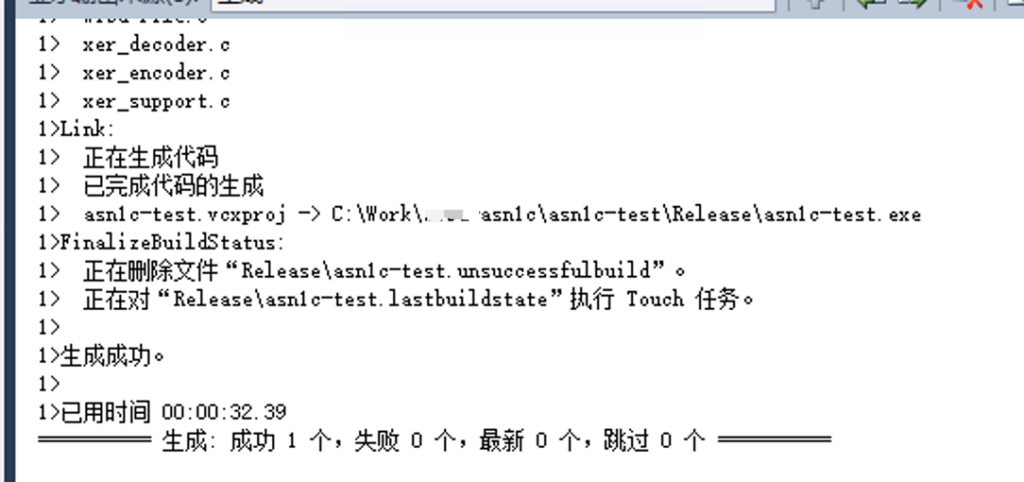
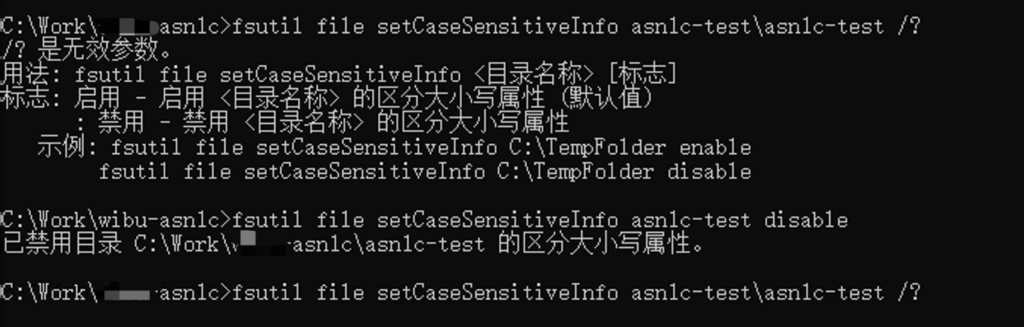
    用了一个古老的工具 asn1c,结果定义文件里有个 Time 类型,生成了 Time.h,而这个工具自己把所有文件放在一个目录里,不得不把源码目录放到include path里,于是祭出大法。。。

    fsutil file setCaseSensitiveInfo asn1c-test disable
    fsutil file setCaseSensitiveInfo asn1c-test enable

    结论,vs工程源码目录要单放,至少 vs2010 工程默认的设置里,有的地方用 Release 有的地方用 release。

  • Windows 下vcpkg 与bindiff

    vcpkg 是 微软的一种包管理方式,对于curl之类的库,目前看使用 vcpkg可能是比较好的下载安装方式,比自己编译简单太多。

    遇到了一个需要逆向的程序,经过人肉特征分析,程序里发现使用了 curl 的一个老版本,这个版本的二进制已经不提供下载了,虽然通过 web.archive.org 拿到了要的版本,但是是 mingw 的,而且没有调试信息用起来不方便。

    于是,记录一下 vcpkg 操作的过程。

    下载不提了,假设安装完 vcpkg 后,在一个空白的工作目录,建立 vcpkg.json

    {
       "name": "curl-test",
        "dependencies": [ "curl", "libsodium" ],
        "overrides": [
            { "name": "curl", "version": "8.0.0" }
        ]
    }

    然后在这个目录执行 (我要分析的程序静态链接了curl,而且是32位的)

    ..\vcpkg\vcpkg.exe install --triplet x86-windows

    上边这个配置文件的例子其实是成功不了的,错误提示是

    error: C:\Work\packages\vcpkg.json was rejected because it uses "overrides" and does not have a "builtin-baseline". This can be fixed by removing the uses of "overrides" or adding a "builtin-baseline".
    See `vcpkg help versioning` for more information.

    我没找到正确姿势,但是看到这个baseline 跟git版本疑似有关,偷懒但是生效了

    第一步,加一个 "builtin-baseline":"HEAD",再次执行,报错变成了

    the top-level builtin-baseline (HEAD) was not a valid commit sha: expected 40 hexadecimal characters.You can use the current commit as a baseline, which is:
            "builtin-baseline": "61f610845fb206298a69f708104a51d651872877"
    note: updating vcpkg by rerunning bootstrap-vcpkg may resolve this failure.

    直接改json。

    接下来,bindiff的问题。

    一般程序不可能静态链接一个 debug 版本的库,所以直接用 ida pro分析 release 版本的二进制,而 vcpkg 的目录里带了调试信息,在 match的时候会比较简单。

    #EOF

  • 记录一个软件 API Monitor

    http://www.rohitab.com/apimonitor

    找了好长时间,终于找到了。

    需求是找一个工具记录软件的 DeviceIOControl 的调用,用来查设备驱动被哪个用户软件调用,且最好能找到调用的参数或者内容。

    在找到这个之前,试过了nirsoft / deviceioview、MartinDrab / IRPMon、zodiacon / DriverMon、Fyyre / DrvMon、DynamoRIO / drmemory,很遗憾,各种问题都用不了。

    而这个工具能记录目标程序的具体哪个DLL、哪个线程调用了哪些调用,相当神器。

    遇到的问题:记录数据不全,设置限制了最大的数据抓取4096字节,且输入长度最大4个字符。

    解决的方案:半解决吧,patch了程序。用 4096 搜立即数,找到了限制最大值的代码,逐个改成 0x400000;搜 EM_SETLIMITTEXT,看到定义是 0xC5,当立即数搜索,查找 SendMessageW 的调用,定位了两个框的限制,改成了8。

  • Protected: 某驱动调试手记(更新中)

    This content is password-protected. To view it, please enter the password below.

  • Protected: 北京联通F4610 管理员登录

    This content is password-protected. To view it, please enter the password below.